Category: Uncategorized
Magic Windows: Office Hours 2.22 / Rui Pereira
This week we talked about exploring speech as an input for object augmentation. Thinking about WonderScope and GardenFriends.
Magic Windows: HW3
Hands on
Write a brief paragraph about your idea on augmenting an object.
This should be initial concept for next week’s assignment.
Be clear about your idea, inspirations and potential execution plan.
For this assignment I hope to explore an aspect of my thesis project. For thesis I’m working on a memory quilt designed for my nephews (target age 4/5ish) that uses AR to unlock memories around tree id-ing and walks they’ve taken with their family (mainly parents). This project is inspired by the tree id-ing walks they already go on, my nephews enjoyment of AR and quilts made in our family. The quilt will include repurposed squares from my brothers childhood quilt.
The augmented object will be patches on the quilt illustrated with contour lines of leaves of local trees in their neighborhood like a tulip poplar. When the phone (with vuforia) is held over the patch, the name of the tree will appear, encouraging the name to be read. As you read it the leaf and words will fill in with color in (similar to the voice interaction of wonderscope). when the whole name has been said it will unlock images of trees of they’ve found on past walks / hikes (that have been tagged to that target).
Brain on
List potential input (sensory) and output( feedback) modes that you can leverage in the real world – translate these into technical possibilities using current technology (you can use your mobile device but feel free to bring any other technology or platform (Arduino? Etc..) that you can implement.
Input / Sensory
- sound
- speech
- peripheral senses – ambient light to signal a shift in weather (thinking of the experiments mentioned in reading Tangible Bits: Towards Seamless Interfaces Between People, Bits and Atoms by Hiroshi Ishii and Brygg Ullmer)
- temperature
- motion
- human connection / like touch
- a force / or amount of pressure exerted
- distance between objects
- time (between actions) / duration
- accelerometer / orientation / tilt sensors
- sentiment analysis / emotionally quality of messages & speech
- arduino + distance sensor
- FSR
Output / Feedback
- arduino + heating pad + thermo ink (ex: Jingwen Zhu’s Heart on My Dress)
- animation (play, pause skip around time codes)
- air flow like Programmable Air / expand – contract
- arduino + a range of things like neopixels
- animate or unlock something visual on a mobile device
Choose one of each (input, output) and create a simple experience to show off their properties but, also, affordances and constraints.
- voice / visual feedback – coloring in of leaf with saying a word
- SFSpeechRecognizer
- An object you use to check for the availability of the speech recognition service, and to initiate the speech recognition process.
Experiments: (quick prototype – sliding images / illustrations into view as they would be unlocked through audio / speech recognition)
would like to do another quick experiement that gets both sides of interaction, was only able to get the SFSpeechRecognizer example to work would love for specific words to activate the animations shown above. Was also able to getthe unity tutorials from the past couple weeksup and going on my updated unity again ❤
And loved reading the papers provided including: Tangible Bits: Towards Seamless Interfaces Between People, Bits and Atoms by Hiroshi Ishii and Brygg Ullmer @ MIT Medialab / Tangible Media Group. (post here) and BRICKS: LAYING THE FOUNDATIONS FOR GRASPABLE USER INTERFACES (post here)
Thesis: Office Hrs 2.19 / Katherine Dillon
more soon ❤
Thesis: Office hours 2.18 / Sarah Rothberg
Met with Sarah today to check in about thesis updates. We walked through the mvp and talked about what to note from it for future:
- for documentation
- reshoot video of mvp experience (can use as reference later down the line)
- include storyboards
- start noting anytime specific design forks happen, or decisions made for a certain effect // keep a log
- ex: choosing to make the app less game like (instead of having extra mobile navigation options, choosing to keep it simple, focusing more on the human interaction
- ex: what does it mean to bring the tech to the night time routine?
- instead – making design decisions that encourage day time use of
- choosing to make a throw sized quilt verses a twin or queen
- update thesis journal
- to include all requested items / weekly posts that are mirrored in personal blog
- think more of a lit review verses bibliography / works cited – how does the research support or feed into the larger concepts being explored. how does it affect your thinking or project?
- Questions for User testing
- who is holding the phone? (parent / kid)
- how to solidify that its a multi user experience / underscore the time spent together – human interaction
- what scenarios / time of day would quilt be used? verses bedtime?
PT 2 – Class 2
In Class (2.11)
Presentations Part II
Breakout groups Prototype Review
- develop questions for user testing to see if your prototype meets your personal rubric (and the ITP requirements)
- Discuss strategies for user testing and evaluate your schedules
Assignments:
Keep working (“AYP”):
- Option 1: develop and refine your current prototype
- Option 2: develop a second simple prototype if your first did not satisfy your personal rubric
- User Testing: Using your prototype and specific questions, do a user test with three people outside of our class, one of whom should be an outside expert in your field. Take notes, post on the blog.
Highly Recommended (after your prototype user test):
- Create a more refined schedule (with specific tasks) for getting you to a functional, documented version of your project by March 10. If you’re not ready to do this, please make an OH with Sarah to discuss why not!
Mobile Lab: HW3 Egg Timer


For this week we were to work through / review Swift progamming pt 1 and pt 2 lab and create an egg timer app based off of the mobile lab code kit. Was very inspired by a kids visual timer app called Tico Timer. It uses simple shapes and animations to visualize a countdown. Was also very thankful for the example “Array of Circles” sent to us. I combined a little bit of the code kit with the array of circles code. You can add minutes up to an hour and counts down visually in both seconds in blue rectangles and minutes in orange.
Would like to redesign building logic off of 1 timer. My app is a little out of sync due to using two different time / counter functions – 1 for seconds and one for minutes. Would also like to explore adding in more visual,physical or audible feedback. Maybe add vibration when it hits zero ❤ My first version I tested out with text (below) and then for second version (shown above) removed text for colors to help signify the start, reset and add minute functions

1st Version with text


Helpful Links/ Tutorials
Code
// ContentView.swift
// ArrayOfCircles
// Created by Nien Lam on 2/18/20.
// Copyright © 2020 Mobile Lab. All rights reserved.
import SwiftUI
struct ContentView: View {
// @State var count = 0
@State var secRemaining = 60
@State var minRemaining = 0
// Flag for timer state.
@State var timerIsRunning = false
// Timer gets called every second.
let timerSec = Timer.publish(every: 1, on: .main, in: .common).autoconnect()
let timerMin = Timer.publish(every: 60, on: .main, in: .common).autoconnect()
var body: some View {
VStack {
// timer 1
VStack {
ForEach((0..<6).indices) { rowIndex in
HStack {
ForEach((0..<10).indices) { columnIndex in
Rectangle()
.fill(self.secRemaining <= rowIndex * 10 + columnIndex
? Color.white
: Color.blue)
.frame(width: 20, height: 20)
}
}
}
ForEach((0..<6).indices) { rowIndex in
HStack {
ForEach((0..<10).indices) { columnIndex in
Rectangle()
.fill(self.minRemaining <= rowIndex * 10 + columnIndex
? Color.white
: Color.orange)
.frame(width: 20, height: 20)
}
}
}
}
// .padding()
// .background(Color.black)
//
// start / stop button
Button(action:
{
self.timerIsRunning.toggle()
print(“Start”)
print(“Min Remaining:”, self.minRemaining)
print(“Sec Remaining:”, self.secRemaining)
}) {
Text(” “)
.frame(width: 100)
.padding()
.foregroundColor(Color.green)
.background(Color.green)
.padding()
}
// update countdown function
.onReceive(timerSec) { _ in
// Block gets called when timer updates.
// If timeRemaining and timer is running, count down.
if self.secRemaining > 0 && self.timerIsRunning {
self.secRemaining -= 1
print(“Time Remaining:”, self.secRemaining)
}
}
.onReceive(timerMin) { _ in
// Block gets called when timer updates.
// If timeRemaining and timer is running, count down.
if self.minRemaining > 0 && self.timerIsRunning {
self.secRemaining = 61
self.minRemaining -= 1
print(“Time Remaining:”, self.minRemaining)
}
}
// reset button
Button(action: {
self.timerIsRunning.toggle()
self.secRemaining = 0
self.minRemaining = 0
}) {
Text(” “)
.frame(width: 100)
.padding()
.foregroundColor(Color.red)
.background(Color.red)
.padding()
}
// add time minutes – timer 2
Button(action:
{
self.minRemaining += 1
print(“Add minute”)
}) {
Text(“ “)
.frame(width: 100)
.padding()
.foregroundColor(Color.orange)
.background(Color.orange)
.padding()
}
// add time minutes – timer 1
// Button(action:
// {
// self.secRemaining += 1
// print(“Add second”)
//
// }) {
// Text(“ “)
// .frame(width: 100)
// .padding()
// .foregroundColor(Color.blue)
// .background(Color.blue)
// .padding()
// }
}
}
}
struct ContentView_Previews: PreviewProvider {
static var previews: some View {
ContentView()
}
}
Criteria:
- Design and UI can NOT use any numbers or text
- Review native iOS timer functionality
- Must be able to set any interval up to 1 hour
- Must have functionality for Start, Cancel and Pause
- Design system must accurately communicate minutes and seconds
- Must have visual and/or audio and/or haptic feedback when timer finishes
- Consider Affordances, Signifiers, Mappings and Feedback in the app design
- Post documentation to #sp2020-homework channel on Slack. Include the following:
- 1-2 sentence description
- 2-3 screenshots
- short video
- GitHub link to code
Original Codekit Example
Magic Windows: W3 Reading – Developing Augmented Objects: A Process Perspective
Paper link here
Magic Windows: W3 reading – Tangible Bits: Towards Seamless Interfaces between People, Bits and Atoms
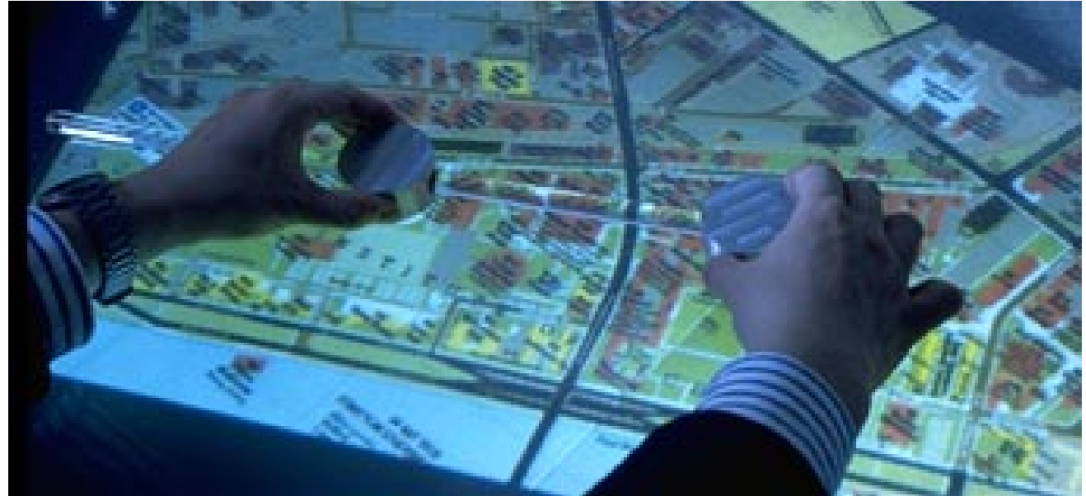
Tangible Bits: Towards Seamless Interfaces Between People, Bits and Atoms by Hiroshi Ishii and Brygg Ullmer @ MIT Medialab / Tangible Media Group. It is not a proposed solution but hopes to “raise a new set of research questions to go beyond the GUI (graphic user interface)”
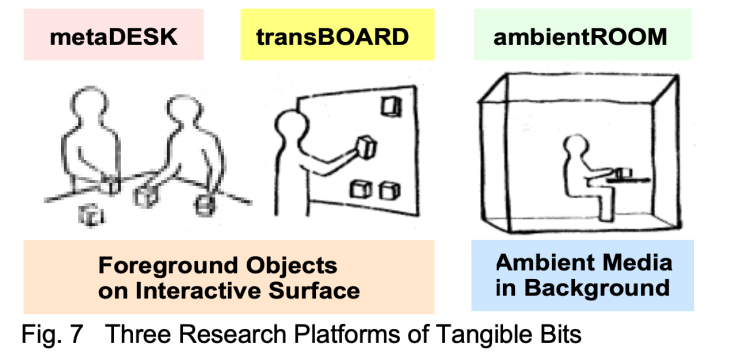
In the paper they break down 3 essential ideas of Tangible bits:
- interactive surfaces
- coupling of bits with graspable physical objects
- ambient media for background awareness
Using 3 prototypes for illustration:
- metaDESK
- transBOARD
- ambientROOM
Tools throughout history
It begins with the reflection on how before computers people created a rich and inspiring range of objects that measure the passage of time, predict the planets movements, to compute and draw shapes. A lot of them are made of a range of beautiful materials from oak to brass( such as items in the Collection of Historical Scientific Instruments).
” We were inspired by the aesthetics and rich affordances of these historical scientific instruments, most of which have disappeared from schools, laboratories, and design studios and have been replaced with the most general of appliances: personal computers. Through grasping and manipulating these instruments, users of the past must have developed rich languages and cultures which valued haptic interaction with real physical objects. Alas, much of this richness has been lost to the rapid flood of digital technologies.”
Bits & Atoms
What has been lost in the advent of personal computing? How can back physicality and its benefits to HCI. This question brought them to the thought of Bits & Atoms. That “we live between two realms: our physical environment and cyberspace. Despite our dual citizenship, the absence of seamless couplings between these parallel existences leaves a great divide between the worlds of bits and atoms”. Yet we’re expected at times to be in both worlds simultaneously, why do our interfaces not reflect or provide this bridging(thinking at the time of the published paper)?
Haptic & Peripheral Senses

Weather changes can be swift, Campeche Bay, Mexico.

They mention that we have created ways of processing info through working with physical things like Post it notes. Or how we might be able to sense a change of weather through a shift in ambient light. However these methods are not always folded into the developing of HCI design. That there needs to be a more diverse range of input/output media – currently there is “too much bias towards graphical output at the expense of input from the real world”
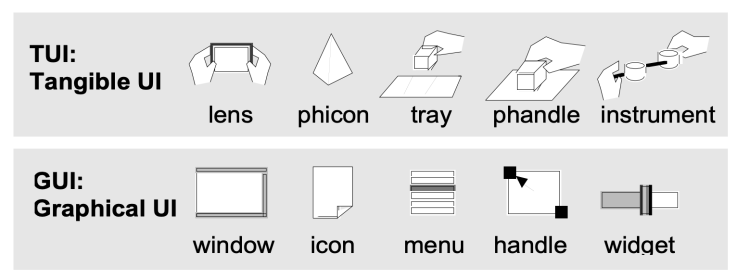
From Desktop to Physical Environment: GUI to TUI
Xerox Star workstation laid the foundation for the first generation of GUI, a desktop metaphor,
” The Xerox Star (1981) workstation set the stage for the first generation of GUI, establishing a “desktop metaphor” which simulates a desktop on a bit-mapped screen. Also set several important HCI design principles, such as “seeing and pointing vs remembering and typing,” and “what you see is what you get.”
Apple then brought this style of HCI to the public in 1984. Pervasive through Windows and more. In 1991 Mark Weiser published “Ubiquitous Computing.”
Keywords tangible user interface, ambient media, graspable user interface, augmented reality, ubiquitous computing, center and periphery, foreground and background. It showed a different style of computing / HCI that pushes for computers to be invisible. Inspired by this paper they seek to establish a new type of HCI called “TUIs”. Tangible User Interfaces, augmenting the real world around us by pairing with digital information to everyday things and spaces.
Magic Windows: W3 Reading – Bricks: Laying the Foundations for Graspable User Interfaces
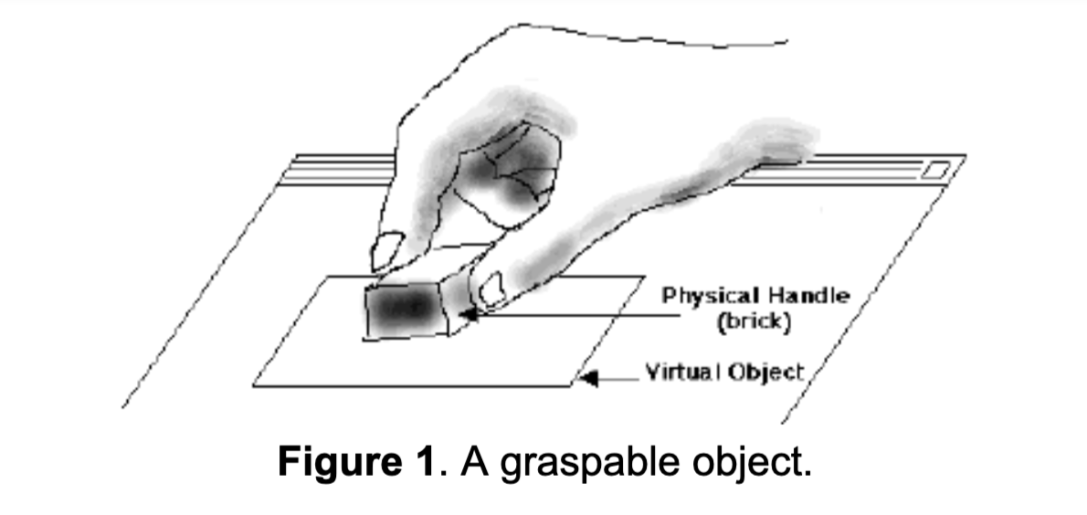
Bricks: Laying the Foundations for Graspable User Interfaces
An argument for virtual items having physical forms. That physical items allow for richer interactions /affordances that ” include facilitating two handed interactions, spatial caching, and parallel position and orientation control”.
This paper was publiched in the ACM proceedings of CHI ’95 by George Fitzmaurice, Hiroshi Ishii, and William Buxton. It Introduces the concept of Graspable User Interfaces which allow for control of electronic or virtual objects via physical control handles. The “bricks” are physical objects that function as input devices paired to virtual objects for manipulation or expressing an action. They work with a large display surface that they deemed the “active desk”. In the paper they present 4 stages:
-
- series of exploratory studies on hand gestures / grasping
- interaction simulations using mockups / rapid prototyping tool
- working prototype and sample application called GraspDraw
- initial integration of graspable UI concepts into a commercial application
Space multi-plexed object
“With space-multiplexed input, each function to be controlled has a dedicated transducer, each occupying its own space. For example, an automobile has a brake, clutch, throttle, steering wheel, and gear shift which are distinct, dedicated transducers controlling a single specific task.”
Time multi-plexed object
“uses one device to control different functions at different points in time. For instance, the mouse uses time multiplexing as it controls functions as
diverse as menu selection, navigation using the scroll
widgets, pointing, and activating “buttons.””
GUIs as an example of dissonance
“the display output is often space-multiplexed (icons or control widgets occupytheir own space and must be made visible to use) while the input is time-multiplexed (i.e., most of our actions are channeled through a single device, a mouse, over time). Only one task, therefore, can be performed at a time, as they all use the same transducer. The resulting interaction techniques are often sequential in nature and mutually exclusive.”
The Graspable UI philosophy as proposed solution for this dissonance (bullets from paper)
-
- “It encourages two handed interactions [3, 7];
- shifts to more specialized, context sensitive input devices;
- allows for more parallel input specification by the user, thereby improving the expressiveness or the communication capacity with the computer;
- leverages off of our well developed, everyday skills of prehensile behaviors [8] for physical object manipulations;
- externalizes traditionally internal computer representations;
- facilitates interactions by making interface elements more “direct” and more “manipulable” by using physical artifacts;
- takes advantage of our keen spatial reasoning [2] skills;
- offers a space multiplex design with a one to one mapping between control and controller; and finally,
- affords multi-person, collaborative use.”
KEYWORDS: input devices, graphical user interfaces,
graspable user interfaces, haptic input, two-handed
interaction, prototyping, computer augmented environ-
ments, ubiquitous computing
Basic Concepts
Additional Word Bank:
- transducer – a device that converts energy from one form to another
- multiplexing – “method by which multiple analog or digital signals are combined into one signal over a shared medium. The aim is to share a scarce resource. For example, in telecommunications, several telephone calls may be carried using one wire. Multiplexing originated in telegraphy in the 1870s, and is now widely applied in communications. In telephony, George Owen Squier is credited with the development of telephone carrier multiplexing in 1910.”
- think back to pcomp/icm exploration
- space-multiplexed
- time-multiplexed
-
paradigm – a typical example or pattern of something; a model.
-
concurrence – the fact of two or more events or circumstances happening or existing at the same time.
- haptic technology
 30 KM/s