textiles & togetherness – 3.6.20

Ashley and I kept working alongside on our textile projects. Ashley continued weaving and I worked on creating smaller image targets for a soft mvp quilt. I decided to hold off on the bottlebrush buckeye and think of another for the future.

Depending on ability to build out collections digitally, may only focus on 1-3 species for first stages, but for now drew out space for 6, 5 drawn and 1 held for a new species. I layered the images in photoshop to make one printable stencil. Tracing on the muslin with the image underneath, first in pencil to mark/ brainstorm positioning, and then after all after positioned, filled in with sharpie.
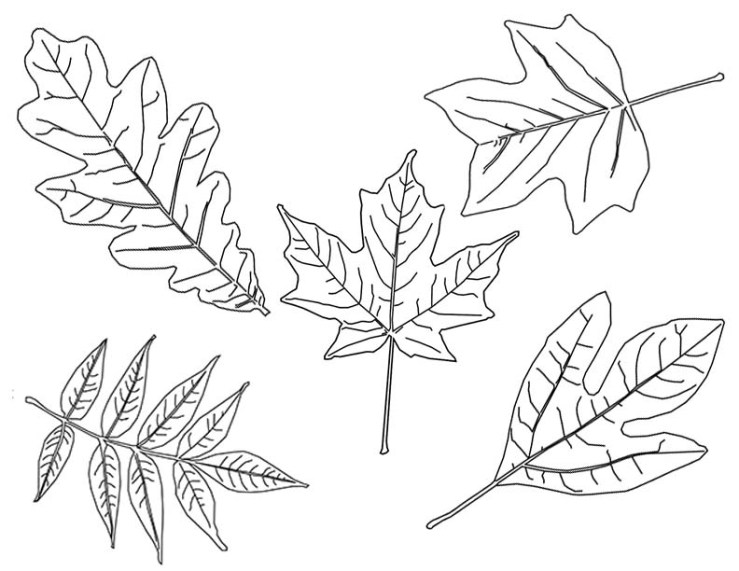
 

MVP2_LeafPrintPage1

3.4.20 – Understanding ARfoundation Image Tracking

After working through some examples / tutorials last night, I decided to sift back through the AR Tracked Image Manager documentation to see about the following:

  •  multiple targets via an XRReferenceImageLibrary 
    • encountered issues when sifting through the ARfoundation example via GitHub ❤ mostly worked though! Was having trouble showing the last 3 I added
  • dynamic + modifiable / mutable libraries in runtime 
    • how to dynamically change the image library live via ios camera or camera roll  (most likely through a MutableRuntimeReferenceImageLibrary)


Helpful References:


Looking through the ARfoundation Trackables / ImageTracking Documentation: 

  • AR Tracked Image Manager 
    • The tracked image manager will create GameObjects for each detected image in the environment. Before an image can be detected, the manager must be instructed to look for a set of reference images compiled into a reference image library. Only images in this library will be detected


  • Reference Library  
    • XRReferenceImageLibrary
    • RuntimeReferenceImageLibrary
      • RuntimeReferenceImageLibrary is the runtime representation of an XRReferenceImageLibrary
      • You can create a RuntimeReferenceImageLibrary from an XRReferenceImageLibrary with the ARTrackedImageManager.CreateRuntimeLibrary method

Thesis: Thinking Through Steps

Thinking Through Steps

Our resident Ilana has been so incredibly helpful (see past post). Was able to get on ITP’s share apple developer account to help with app build limits & was able to finally get my personal one sorted as well ❤ Before office hours she mentioned to check out the next few things:

  1. Be able to create an AR app that places an image on an image target.
  2. Take a photo with your camera/access camera library and as you use the image target that image appears on it. (Try using the plugin)
  3. Take multiple photos or choose multiple images and attach that to your image target.
  4. Add two different image targets. Make that when you take it or select photo to add in your app you will have to ‘tag’ them to a specific image target. The user now will be able to see the specific tagged images in each one of the targets


1 & 2 

Targets & Photo to Texture – Here are some links to different tests so far that help answer prompts 1 & 2. Note the ARFoundationExamples on Github too


  • Vuforia W2 tutorial Magic Windows
  • Screen test only / Try on mobile


  • Vuforia W3 tutorial Magic Window
  • Screen test only / Try on mobile


  • ARfoundationPointCloud/ Plane Detection & Place Cube tutorial Magic Windows


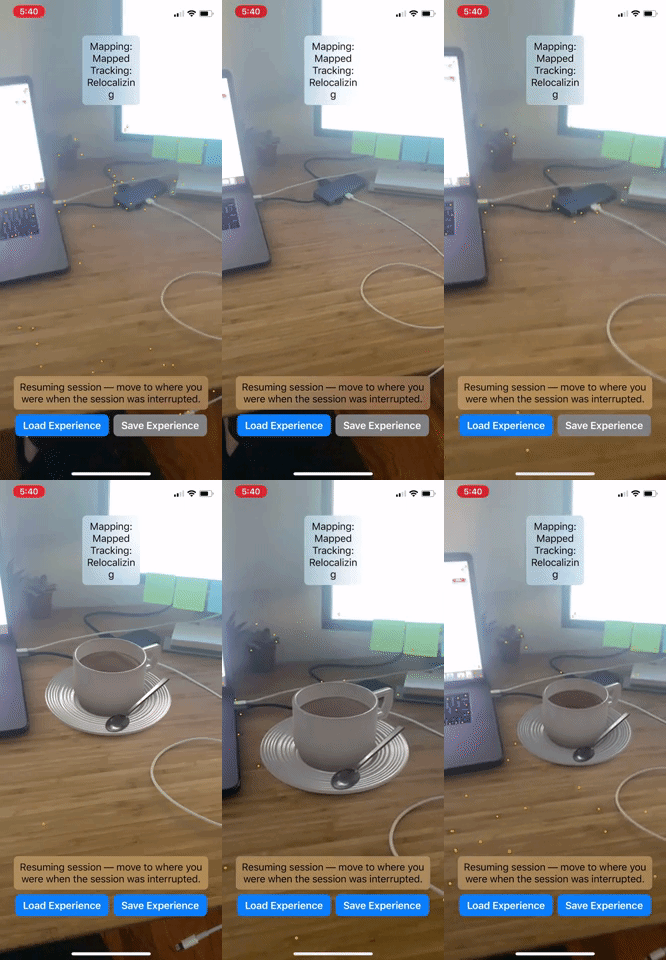
  • Exploring how to save and load session data / to not lose when things have been placed previously see post here


Had difficulty with executingthis tutorial on ARfoundation Image Tracking – builds to device but only flickrs briefly when activated.


Speech/ Reading Explorations 

  • Speech Test with Teachable Machines / P5js
  • See blog post exploring words vs phonemes


  • Speech Recognition Test on Mobile
  • Same blog post as above


Additional References: 

ARKit developer references

This weekend will be exploring a range of SDK examples. Began a spreadsheet to keep track of process. Will bullet out the info here from ARKits Apple Developer Page:


Helpful links:


Essentials


Camera ( Get details about a user’s iOS device, like its position and orientation in 3D space, and the camera’s video data and exposure. ) 


QuickLook ( The easiest way to add an AR experience to your app or website.)

  • Previewing a Model with AR Quick Look
  • class ARQuickLookPreviewItem
  • Adding Visual Effects in AR Quicklook


Display ( Create a full-featured AR experience using a view that handles the rendering for you)

  • class ARView

    A view that enables you to display an AR experience with RealityKit.

  • class ARSCNView

    A view that enables you to display an AR experience with SceneKit.

  • class ARSKView

    A view that enables you to display an AR experience with SpriteKit.


WorldTracking (Augment the environment surrounding the user, by tracking surfaces, images, objects, people, and faces.)

Discover supporting concepts, features, and best practices for building great AR experiences.

A configuration that monitors the iOS device’s position and orientation while enabling you to augment the environment that’s in front of the user.

A 2D surface that ARKit detects in the physical environment.

  • class ARWorldMap

    The space-mapping state and set of anchors from a world-tracking AR session.


Magic Windows: The Poetics of Augmented Space

Lev Manovich, The Poetics of Augmented Space // http://manovich.net/content/04-projects/034-the-poetics-of-augmented-space/31_article_2002.pdf

“Going beyond the ‘surface as electronic screen paradigm’, architects now have the opportunity to think of the material architecture that most usually preoccupies them and the new immaterial architecture of information flows within the physical structure as a whole. In short, I suggest that the design of electronically augmented space can be approached as an architectural problem. In other words, architects along with artists can take the next logical step to 28 28 consider the ‘invisible’ space of electronic data flows as substance rather than just as void – something that needs a structure, a politics, and a poetics. “

PT 2 – Class 3

Class 3: February 25

Small group reviews with Advisor and Residents

Prep for Midterms

Assignments:

Keep working and posting!!!

Prepare and practice your 5 minute midterm presentation. It should include: 

    • YOUR THESIS STATEMENT
    • WHY YOU CHOSE THIS TOPIC? WHY IS IT IMPORTANT / IMPORTANT TO YOU / IMPORTANT TO US? 
    • YOUR PROGRESS SO FAR
    • WHAT WILL YOU HAVE DONE BY THE END OF THE SEMESTER? 
    • (OPTIONAL BUT HIGHLY ENCOURAGED) A QUESTION OR TWO TO GUIDE YOUR FEEDBACK

Sign up for your presentation time 

Add your slides to this doc and check them in an incognito window before class if you have video!

Watch at least two thesis presentations: https://itp.nyu.edu/thesis2019/, https://itp.nyu.edu/thesis2018/, https://itp.nyu.edu/thesis2017/

Perhaps write a post about what lessons you learned that can apply to your own process!